

Most organisations do not buy cloud computing services because they want servers in someone else's building. They buy them to fix something that already hurts: releases that eat a whole weekend, an audit that swallows three weeks of an engineer's time, a traffic spike that knocks out checkout on the busiest morning of the quarter. The cloud is a means to those ends. And the shape you pick matters far more than the logo on the invoice.
This guide is for the person who actually owns that decision inside a regulated environment. A bank. A government department. A hospital group. An insurer that answers to a regulator every quarter. You already know what a virtual machine is, so we will skip the 101. What you probably need instead is a straight read on service models, on when multi-cloud is worth its complexity and when it is just expensive, and on how to move software into these environments without turning security into the checkpoint everyone quietly learns to route around.
We will walk the migration model SecNinjaz uses with regulated clients, one step at a time. We will show exactly where DevSecOps and Kubernetes fit, with a sample pipeline you can read. And we will be honest about the parts that go sideways, because a playbook that only describes the happy path is not much of a playbook.
Talk to the SecNinjaz cloud team →
What "cloud computing services" actually covers
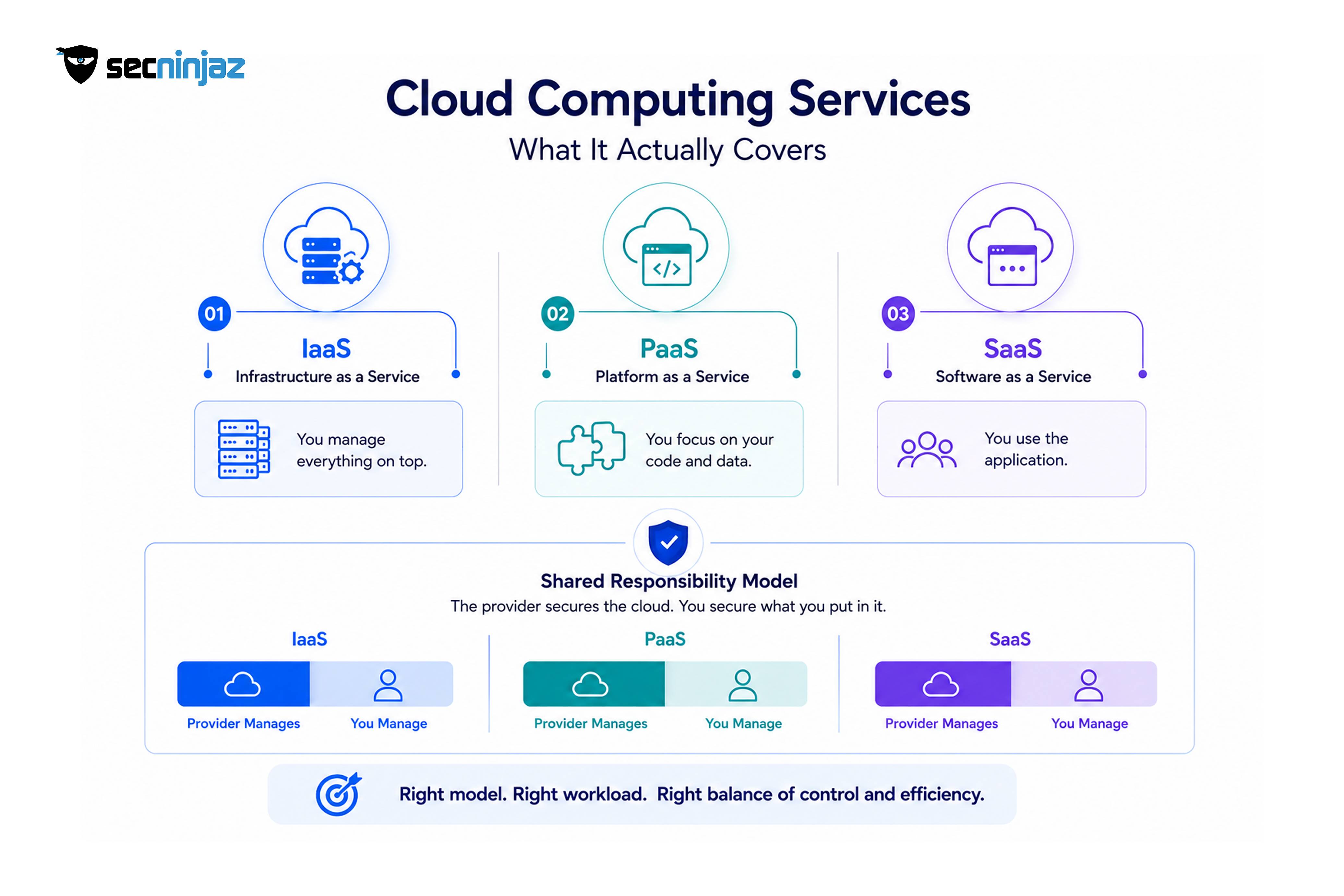 The phrase gets used loosely. When a vendor says cloud computing services, they might mean raw infrastructure, a managed database, an entire SaaS product, or a consulting engagement to move you off a data centre. Pinning down which layer you are buying is the difference between a clean contract and a nasty surprise at renewal.
There are three service models worth knowing cold, because almost every cloud offering is a variation on one of them.
- Infrastructure as a Service (IaaS). You rent compute, storage, and networking, then run everything on top yourself: the operating system, patching, the middleware, the app. Think of it as an empty plot with power and water already connected. Maximum control, maximum responsibility.
- Platform as a Service (PaaS). The provider runs the operating system and runtime; you deploy your code and data and mostly forget the plumbing underneath. A managed Kubernetes service or a managed Postgres instance sits here. You trade some control for a lot less toil.
- Software as a Service (SaaS). You just use the application through a browser or an API. Email, CRM, a payroll system. You own your data and your configuration, and not much else.
Here is the part people underestimate: the model you choose quietly reassigns who is responsible for security. That reassignment is the shared responsibility model, and misreading it is behind a genuinely large share of cloud breaches. The provider secures the cloud. You secure what you put in it.
| Service model | Provider manages | You manage | Best fit |
|---|---|---|---|
| IaaS | Physical hosts, hypervisor, network fabric | OS, patching, runtime, apps, data, access | Bespoke workloads, lift-and-shift, tight control needs |
| PaaS | OS, runtime, managed services | Your code, configuration, data, access | Fast delivery, teams that would rather not run servers |
| SaaS | Almost everything | Your data, users, configuration, access | Commodity functions where building is a waste of time |
For a regulated organisation, that final column is where the real thinking happens. A core banking ledger is not a candidate for a generic SaaS. A staff leave tracker almost certainly is. Most estates end up as a deliberate mix, and getting that mix right is a large part of what a cloud computing services provider should be helping you reason through, not just provision.
Single cloud, hybrid, or multi-cloud: picking the shape before you migrate
Before anyone touches a migration tool, settle the topology. This is the decision that shapes cost, risk, and your team's daily life for years, and it is much cheaper to get right on a whiteboard than to unwind after eighteen months.
Single cloud means committing to one provider for the bulk of your estate. It is the simplest to operate. Your team learns one set of tools, one identity model, one billing console. You get deeper discounts through committed spend, and you can lean on that provider's higher-order services without writing glue code. The catch is concentration. If that provider has a bad day in your region, so do you. And portability erodes quietly, because every proprietary service you adopt is one more thing to unpick if you ever leave.
Hybrid cloud keeps some workloads on-premises or in a private data centre and connects them to public cloud. Regulated bodies land here often, and for good reasons: a data-residency rule that pins certain records to a specific jurisdiction, a piece of legacy hardware that cannot move yet, or a latency-sensitive system sitting next to a factory floor. Hybrid is not a failure to fully migrate. Sometimes it is the correct end state.
Multi-cloud spreads workloads across two or more public providers on purpose. People reach for it to avoid lock-in, to place a workload wherever it runs best or cheapest, or because a regulator or board wants resilience that does not depend on a single vendor. It is powerful. It is also the most demanding option to run well, and this is where teams routinely underestimate the bill, both in money and in operational load.
So when does multi-cloud actually earn its keep?
- You have a hard resilience mandate that a single provider's availability zones will not satisfy on paper for your auditor.
- Different workloads have a genuine best home. A data or AI workload might run more cheaply on one platform while your identity and collaboration stack lives more naturally on another.
- Lock-in is a board-level risk you have been explicitly told to reduce, not just an engineer's preference.
- A merger or acquisition left you with two clouds and consolidating everything into one would cost more than running both well.
And when is it a trap?
- You want it "for redundancy" but have not costed the duplicated tooling, the second on-call rotation, and the engineers who now need to be fluent in two platforms.
- Your team is already stretched keeping one cloud secure and patched.
- You are early. A startup on Series A rarely benefits from splitting a small estate across two providers. Get one right first.
> Redundancy across clouds only protects you if you have actually tested failover. A standby environment nobody has ever cut over to is a line item, not a safety net. Run the drill before you count on it.
The honest answer for most regulated mid-to-large organisations is a primary cloud with a deliberately scoped second one, plus a hybrid tail for the workloads that genuinely cannot move. Not everything everywhere. That is how the complexity stays survivable.
The SecNinjaz multi-cloud migration model
A migration goes wrong in the planning, not the copying. Moving bytes is the easy part now; tooling handles it. What breaks projects is undiscovered dependencies, a security model bolted on at the end, and a cutover nobody rehearsed. The model below is the sequence SecNinjaz runs with regulated clients, and every stage exists to kill a specific class of failure before it reaches production.
- Discovery and dependency mapping. Inventory everything, including the things nobody documented. The forgotten reporting server. The batch job that runs at 2 a.m. and quietly feeds three downstream systems. Map the traffic between components, because the dependency you miss here becomes the outage you explain to the board later.
- Assessment and disposition. Decide the fate of each workload. The industry shorthand is the six Rs, and it is genuinely useful as a forcing function.
- Landing zone and guardrails. Build the secure foundation before a single workload arrives: account structure, network segmentation, identity, logging, and policy. This is the step teams skip when they are in a hurry, and it is the most expensive one to retrofit.
- Migration waves. Move in small, reversible batches, starting with something low-risk. Never big-bang a regulated estate.
- Cutover and validation. Switch production traffic on a rehearsed runbook, with the rollback path tested, not hypothetical.
- Optimise and decommission. Right-size, tune cost, close the old environment, and only then call it done.
Dispositioning with the six Rs
Not every workload should move the same way, and pretending otherwise is how you end up paying cloud prices for data-centre habits.
- Rehost (lift and shift). Move it as-is. Fast, low-risk, and a fine first step, but it captures very little of the cloud's value on its own.
- Replatform. Move it and make a targeted change, for example swapping a self-managed database for a managed one. Modest effort, real payoff in reduced toil.
- Refactor. Re-architect for the cloud, often toward containers or managed services. The most work and, done selectively on the workloads that matter, the biggest long-term win.
- Repurchase. Retire the custom thing and buy a SaaS that does the job better. Ego aside, this is often the right call for commodity functions.
- Retire. Turn it off. Discovery almost always surfaces systems nobody has used in a year. Switching them off is free capacity and one less thing to secure.
- Retain. Leave it where it is for now, usually for a residency, latency, or contract reason. Retain is a decision, not an oversight, and it should have a review date.
A pattern worth stealing: rehost first to get out of the old data centre and stop the bleeding, then refactor the two or three workloads that genuinely justify it once you are stable. Trying to refactor everything during the migration is how eighteen-month projects become three-year ones.
The landing zone is the part you cannot skip
A landing zone is the pre-built, secured foundation your workloads move into. In a regulated context it usually carries a few non-negotiables: separate accounts or subscriptions per environment so a compromised dev sandbox cannot reach into production; network segmentation with private connectivity for anything sensitive; centralised, tamper-evident logging feeding a place your security team actually watches; and encryption keys you control, with a clear answer to who can decrypt what.
This is where zero trust stops being a slide and becomes configuration. The working assumption is that the network is already hostile, so every request is authenticated and authorised on its own merits, and access is granted just in time rather than standing open. Privileged access management and strong identity and access management are the load-bearing walls here. Zero Trust Architecture, PAM, and IAM sit inside the IT Engineering practice at SecNinjaz for exactly this reason: in a multi-cloud estate, identity is the real perimeter, and it is usually the weakest one.
DevSecOps on Kubernetes: building security in, not bolting it on
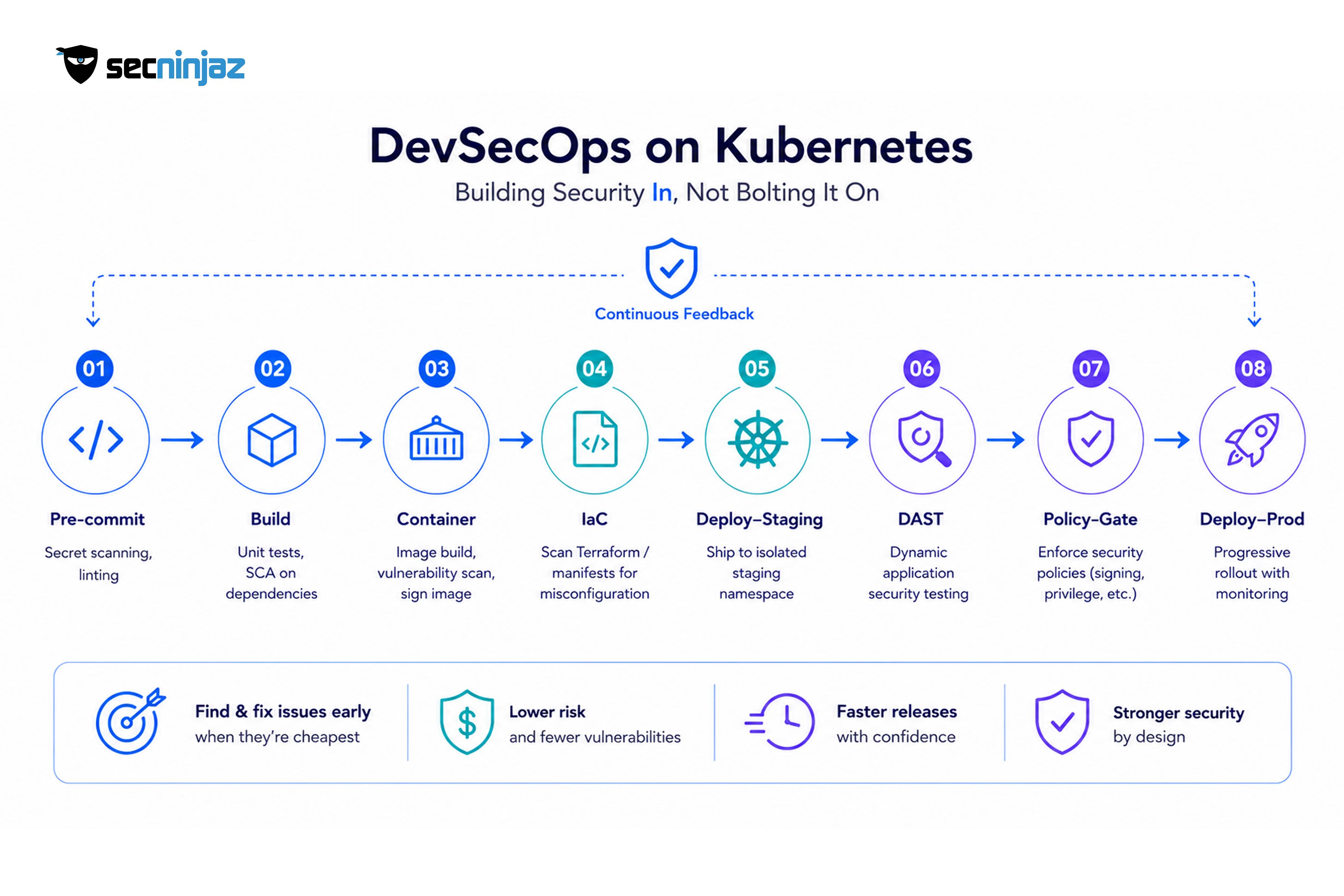 Migrating gets you into the cloud. DevSecOps is how you keep shipping once you are there without your security posture decaying release by release. The idea is not complicated, though living it is: security checks move left, into the pipeline, so problems surface where they are cheap to fix instead of during a penetration test a week before go-live.
The old model put a security review at the end. Developers built for weeks, threw the result over a wall, and waited for a report that arrived too late to act on cleanly. So they shipped anyway and promised to fix it later. Later rarely came. DevSecOps replaces that wall with a series of automated gates, each one small enough that fixing a finding is a normal part of the day rather than a project.
Here is a trimmed version of what a pipeline for a Kubernetes workload tends to look like:
stages:
  - pre-commit        # secret scanning, linting on the developer's machine
  - build             # unit tests, software composition analysis (SCA) on dependencies
  - container         # image build, vulnerability scan, sign the image
  - iac               # scan Terraform / manifests for misconfiguration
  - deploy-staging    # ship to an isolated staging namespace
  - dast              # dynamic testing against the running staging app
  - policy-gate       # admission policy: no unsigned images, no privileged pods
  - deploy-prod       # progressive rollout with runtime monitoring
Each gate answers a different question. Secret scanning at pre-commit stops an access key from ever reaching the repository, which matters because once a secret is in Git history, rotating it is the only real fix and everyone forgets to. Software composition analysis flags the vulnerable open-source library you inherited three dependencies deep. Container scanning catches the base image that shipped with a known CVE. Infrastructure-as-code scanning is the quiet hero: it catches the storage bucket set to public or the security group open to the world before it exists, not after an attacker finds it.
This is also a natural place for deeper offensive testing to plug in. SecNinjaz uses Kaalix AI, its AI-augmented VAPT platform with more than forty integrated security tools, to automate parts of the security testing that would otherwise sit as a manual bottleneck at the end. The point is not to replace a skilled tester. It is to let the pipeline catch the routine findings automatically so human testers spend their time on the logic flaws and abuse cases that scanners genuinely miss.
What Kubernetes security actually demands
Kubernetes gives you enormous flexibility, and it will happily let you configure something wildly insecure by default. The essentials are not exotic, but they do need to be deliberate:
- RBAC, scoped tight. Role-based access control decides who and what can do what inside the cluster. The common failure is handing out cluster-admin because it is easier than reasoning about permissions. Resist that.
- Network policies. By default, every pod can talk to every other pod. In a regulated cluster that is unacceptable. Default-deny, then allow the specific flows you actually need.
- Admission control. Tools like OPA Gatekeeper or Kyverno enforce rules at deploy time: no unsigned images, no containers running as root, no privileged pods. This is the policy-gate stage above, made real.
- Secrets management. Native Kubernetes secrets are only base64-encoded, which is encoding, not encryption. Sensitive material belongs in a proper secrets manager, pulled in at runtime.
- Runtime detection. Scanning before deploy is not enough. You need eyes on the cluster while it runs, watching for the process that should not have started or the connection to an address nobody recognises.
A blunt truth from real assessments: the most common serious Kubernetes finding is not some exotic zero-day. It is over-permissive access, either a service account that can do far more than its workload needs, or a dashboard exposed without authentication. Fix the boring things first. They are what gets exploited.
Security and compliance in regulated cloud environments
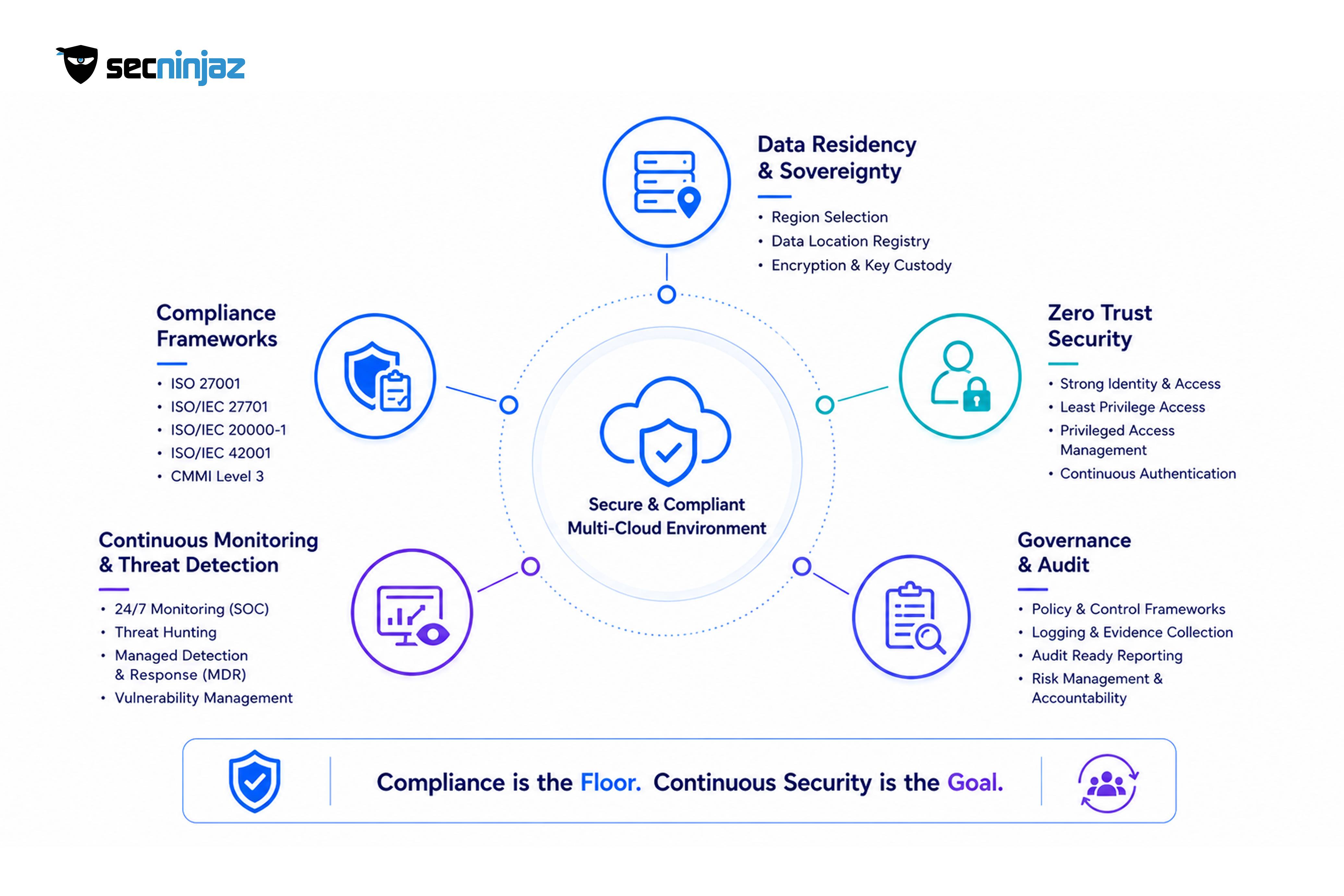 For a bank or a government body, "it works" is only half the requirement. The other half is being able to prove, to an auditor who will not accept hand-waving, that it works safely and lawfully. Cloud computing services do not remove that burden. They change its shape, and if you plan for it early, they can make it lighter.
Data residency and sovereignty. Where your data physically lives is often a legal question, not a technical preference. Under India's Digital Personal Data Protection Act, 2023, processing identifiable personal data carries consent and accountability obligations, and certain data may need to stay within defined boundaries. Your architecture has to encode that: region selection, key custody, and a clear, current record of which datasets sit where. This is not something to discover during an audit.
Standards and certifications as scaffolding. Frameworks give you a checklist that auditors already trust, which is half the value. SecNinjaz operates against a stack of them, including ISO 27001 for information security, ISO/IEC 27701:2025 for privacy information management, ISO/IEC 20000-1:2018 for IT service management, and ISO/IEC 42001:2023 for AI management systems, alongside a CMMI Level 3 appraisal. That AI management standard is becoming relevant faster than most people expected, as more workloads embed models and regulators start asking how those models are governed.
Zero trust as the default posture. In a multi-cloud estate there is no tidy perimeter to defend. Identity becomes the control plane. Every service authenticates, least privilege is enforced rather than aspired to, and privileged sessions are brokered and recorded. This is the same zero trust discipline from the landing zone, now applied continuously rather than just at setup.
Continuous monitoring, because point-in-time is not enough. A clean audit in March tells you nothing about your posture in September. Regulated environments need eyes on the estate around the clock, which is why 24/7 active monitoring, threat hunting, and a managed detection-and-response capability matter more than any single certificate on the wall. The team behind that work holds certifications including CCSK, OSCP, CISSP, and CISM across the group, which is the honest way to say the expertise is real without pretending every engineer holds every credential.
One more thing worth stating plainly: compliance is a floor, not a ceiling. Passing an audit means you met the minimum on the day you were measured. Security is what you do the other 364 days. The organisations that stay out of the breach headlines treat the certificate as a starting line.
Common cloud migration mistakes, and how they actually play out
Patterns repeat across engagements. Here are the ones that cost the most, described as they tend to unfold rather than as abstract warnings.
Lift-and-shift everything, then wonder why the bill went up. A team moves fifty workloads as-is, changes nothing, and gets a cloud invoice larger than the data-centre spend it replaced. This is expected, not a surprise, if all you did was rent the same over-provisioned servers by the hour. Rehosting is a fine first step to exit a data centre. It is a terrible final destination. Right-sizing and selective replatforming are where the savings actually come from.
Treating egress as free. Getting data into a cloud is cheap or free. Getting it out, or moving it between providers, often is not. A multi-cloud design that shuttles large volumes across providers can rack up egress charges that quietly dwarf the compute savings that justified the split. Model the data flows before you commit to the topology, not after the first surprising invoice.
Security as the last gate. When a security review is the final step before go-live, one of two things happens. Either it gets skipped under deadline pressure, or it finds something serious and the launch slips while everyone points fingers. Moving those checks into the pipeline, as covered above, is the fix. It is also, counterintuitively, faster overall, because you are fixing small things continuously instead of a pile of big ones at the worst possible moment.
Identity sprawl. Every migrated workload adds service accounts, roles, and keys. Without discipline this multiplies into thousands of credentials nobody fully understands, and a good chunk of them are over-privileged. Attackers do not break the encryption; they find the forgotten access key with far too much reach. Centralised identity and regular access reviews are unglamorous and they are exactly what saves you.
No tested rollback. A cutover plan that assumes success is not a plan. The question is not whether you can switch to the new environment. It is whether you can switch back, cleanly, at 3 a.m., when something you did not anticipate goes wrong. If you have never rehearsed the rollback, you do not have one.
Here is a small worked example that ties several of these together. Say a mid-sized insurer wants to move its claims platform to the cloud with a multi-cloud resilience goal. The tempting plan is to rehost everything onto two providers at once for maximum redundancy. The better plan, and the one that survives contact with reality: rehost onto a single primary cloud first, in scoped waves, starting with the reporting stack that can tolerate a wobble. Stand up the landing zone with zero trust identity before anything moves. Only once claims is stable and observed for a few cycles do you refactor the two services that genuinely benefit and extend a scoped standby to the second provider, with a failover drill actually executed. Same destination. Roughly a third of the risk, because each step is reversible and nothing depends on getting two unfamiliar platforms perfect on the first try.
How to choose a cloud computing services provider
Once the architecture is clear, the partner question follows. A few criteria matter more than the glossy capability matrix everyone puts in a proposal.
- Clarity on shared responsibility. A good provider tells you, in writing and without being cornered, exactly where their responsibility ends and yours begins for each service. Vagueness here is a red flag you will pay for later.
- Service level agreements that mean something. Read past the headline uptime figure. What is the measurement window? What counts as downtime? What is the remedy when they miss, and is it a credit that actually reflects your loss or a token gesture? A 99.9% SLA still allows for the better part of nine hours of downtime a year, which may or may not be acceptable for what you are running.
- An honest exit path. Ask how you would leave. If the answer is uncomfortable, you are looking at lock-in, and you should price that risk now rather than discover it during a contract dispute.
- Real presence for your residency needs. For DPDP and similar regimes, a provider with infrastructure and support in the right jurisdiction is not a nice-to-have. It is often the whole ballgame.
- A support model that fits your risk. A 24/7 regulated workload needs support that answers at 3 a.m. with someone competent, not a ticketing queue with a next-business-day promise.
A quick way to compare candidates without drowning in feature lists:
| Criterion | What "good" looks like | Warning sign |
|---|---|---|
| Shared responsibility | Documented per service, plainly worded | "We handle security" with no detail |
| SLA | Clear metrics, meaningful remedies | High headline number, vague definitions |
| Exit / portability | Documented data export, open formats | No clear answer, everything proprietary |
| Residency | Infrastructure in your jurisdiction | Data location left deliberately fuzzy |
| Support | 24/7 with real escalation | Business-hours only for a 24/7 workload |
The strongest partners do not just hand you infrastructure and walk away. They help you reason through the service-model mix, run the migration in reversible waves, wire security into delivery, and stay on the estate afterwards. That end-to-end view, from IT strategy and infrastructure architecture through migration, DevSecOps, and 24/7 monitoring, is the shape SecNinjaz brings to regulated cloud work.
Talk to the SecNinjaz cloud team →
Frequently asked questions
What are the three cloud computing service models?
Infrastructure as a Service (IaaS), Platform as a Service (PaaS), and Software as a Service (SaaS). With IaaS you rent raw compute, storage, and networking and manage everything above it. With PaaS the provider runs the operating system and runtime while you deploy code and data. With SaaS you simply use a finished application. The practical difference is how much you manage versus how much the provider does, and each choice quietly reassigns who is responsible for which parts of security.
Is multi-cloud more secure than a single cloud?
Not automatically, and sometimes the opposite. Multi-cloud can improve resilience against a single provider outage, but it also doubles the number of identity models, security tools, and configurations your team has to keep correct. A single cloud, run by a well-staffed team with tight identity controls, is often more secure in practice than two clouds run by a team stretched thin. Multi-cloud earns its security value only when you have the capacity to operate both estates to the same standard.
How long does a multi-cloud migration take?
It depends on the size of the estate and how much you refactor along the way, so anyone quoting a fixed number without seeing your systems is guessing. A useful rule: discovery and landing-zone setup take longer than teams expect, and moving in reversible waves takes longer than a big-bang cutover but fails far less often. A straightforward rehost of a moderate estate might run a few months; a heavy refactor across regulated systems can run well beyond a year. Plan for waves, not a single deadline.
What is the difference between hybrid cloud and multi-cloud?
Hybrid cloud combines on-premises or private infrastructure with public cloud, connecting the two. Multi-cloud means using two or more public cloud providers. They are not mutually exclusive: a regulated organisation might keep certain records on-premises for residency reasons (hybrid) while also splitting public workloads across two providers (multi-cloud). Hybrid is usually driven by residency, latency, or legacy constraints; multi-cloud is usually driven by resilience or a deliberate effort to reduce lock-in.
How does DevSecOps change our release process?
It moves security checks into the delivery pipeline instead of leaving them as a final review. Secret scanning, dependency analysis, container and infrastructure-as-code scanning, and policy enforcement run automatically on every change, so issues surface where they are cheap to fix. The net effect is usually faster delivery, not slower, because you resolve small findings continuously rather than a pile of serious ones right before go-live. The cultural shift matters as much as the tooling: security becomes a shared, daily responsibility rather than a gate someone else owns.
Do we need Kubernetes to do DevSecOps?
No. DevSecOps is a practice, not a platform, and you can apply it to virtual machines, serverless functions, or containers. Kubernetes happens to pair well with it because container images, declarative manifests, and admission control give you natural points to insert automated checks. If your workloads do not justify Kubernetes, do not adopt it just to do DevSecOps. Run the same pipeline discipline on whatever platform actually fits the workload.
How do cloud computing services handle DPDP and data residency?
The responsibility is shared. Providers offer regional infrastructure and controls, but you decide where data lives, who holds the encryption keys, and how consent and access are governed under the Digital Personal Data Protection Act, 2023. In practice this means choosing regions deliberately, keeping key custody clear, maintaining an accurate record of which datasets sit where, and being able to demonstrate all of it to an auditor. Frameworks such as ISO 27001 and ISO/IEC 27701 give you a structure regulators already recognise for proving it.
How do I choose a cloud computing services provider?
Look past the feature list at five things: clarity on the shared responsibility model, service level agreements with meaningful definitions and remedies, an honest and documented exit path, real presence in the jurisdiction your data residency rules require, and a support model that matches your risk (24/7 for a 24/7 workload). A strong partner also helps you get the service-model mix right, runs the migration in reversible waves, and stays involved for monitoring afterwards rather than provisioning infrastructure and disappearing.