
Zimperium's 2026 Mobile Banking Heist Report identified 34 active mobile malware families targeting 1,243 financial applications across 90 countries. In the Asia-Pacific and Japan region, India ranked second in the number of targeted banking applications, with 42 apps affected, behind Australia's 50. The report also identified a 67% year-over-year increase in Android malware-driven financial transactions during 2025.
Kaspersky's 2026 mobile threat telemetry highlights the continuing scale of the problem. Its Q1 2026 report identified 162,275 mobile banking Trojan installation packages, representing a 50% increase over the previous quarter. In Q2 2026, the number declined to 93,574 packages, but banking Trojans remained the most prevalent mobile malware category in Kaspersky's detection data.
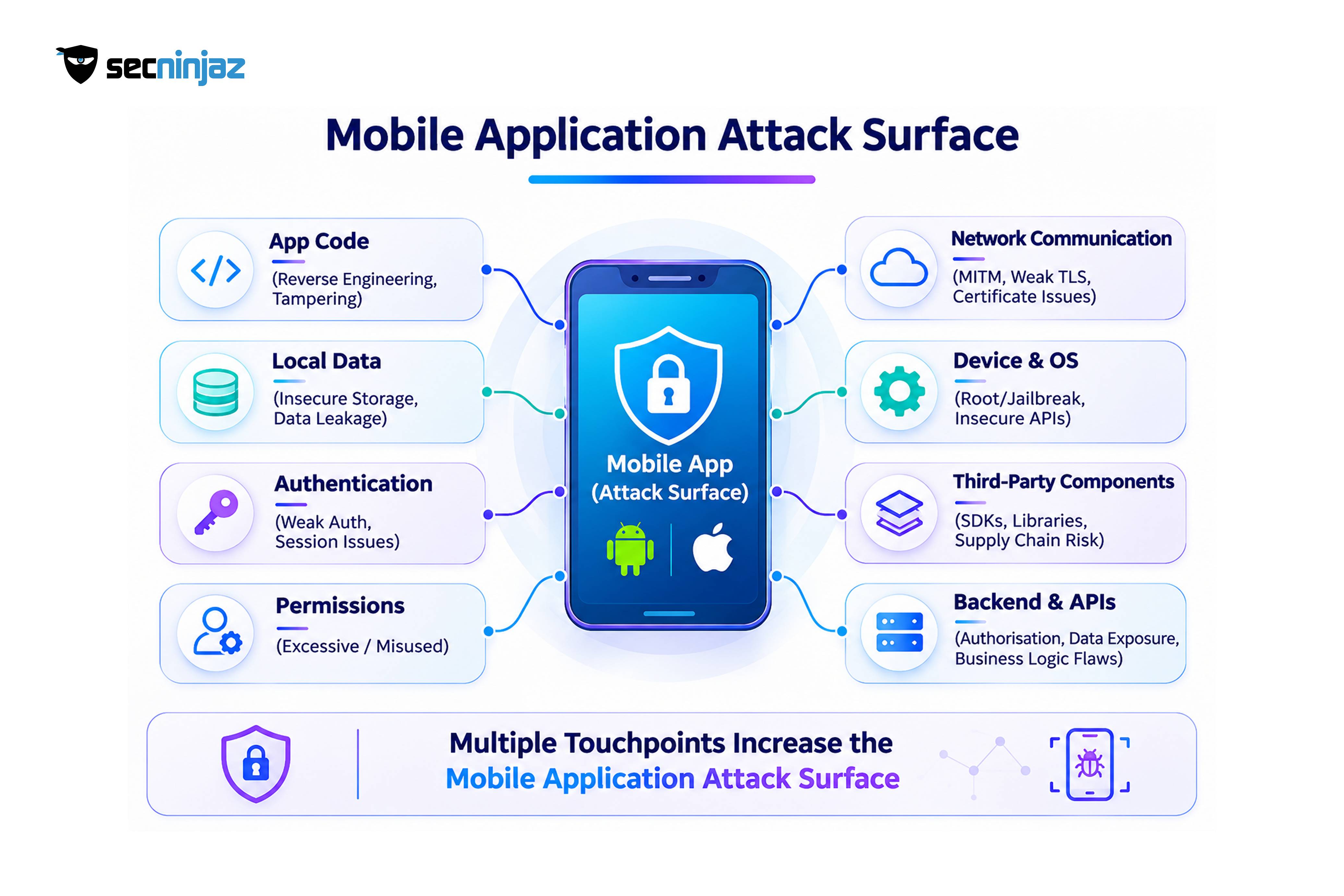
These figures illustrate an important shift in the mobile threat landscape: attackers increasingly target the application running on the user's device, rather than relying exclusively on weaknesses in backend infrastructure. Mobile banking, payment, healthcare, and government applications handle credentials, personal information, financial transactions, and sensitive business operations on devices that organizations do not directly control.
Mobile Application Security Testing (MAST) helps organizations identify weaknesses in application code, local data storage, authentication, communication, platform integration, and runtime protections before attackers exploit them. It combines static analysis, dynamic testing, reverse engineering, and manual security assessment to evaluate how an application behaves under realistic attack conditions.
The pattern behind those numbers is that the app on the user's phone has become the front door of the business. A banking, payments, health, or government app holds credentials, personal data, and the ability to move money or change records, and it runs on a device the organization does not control. Mobile application security testing exists to find out what an attacker, or a piece of malware on the same device, can do to that app before release rather than after.
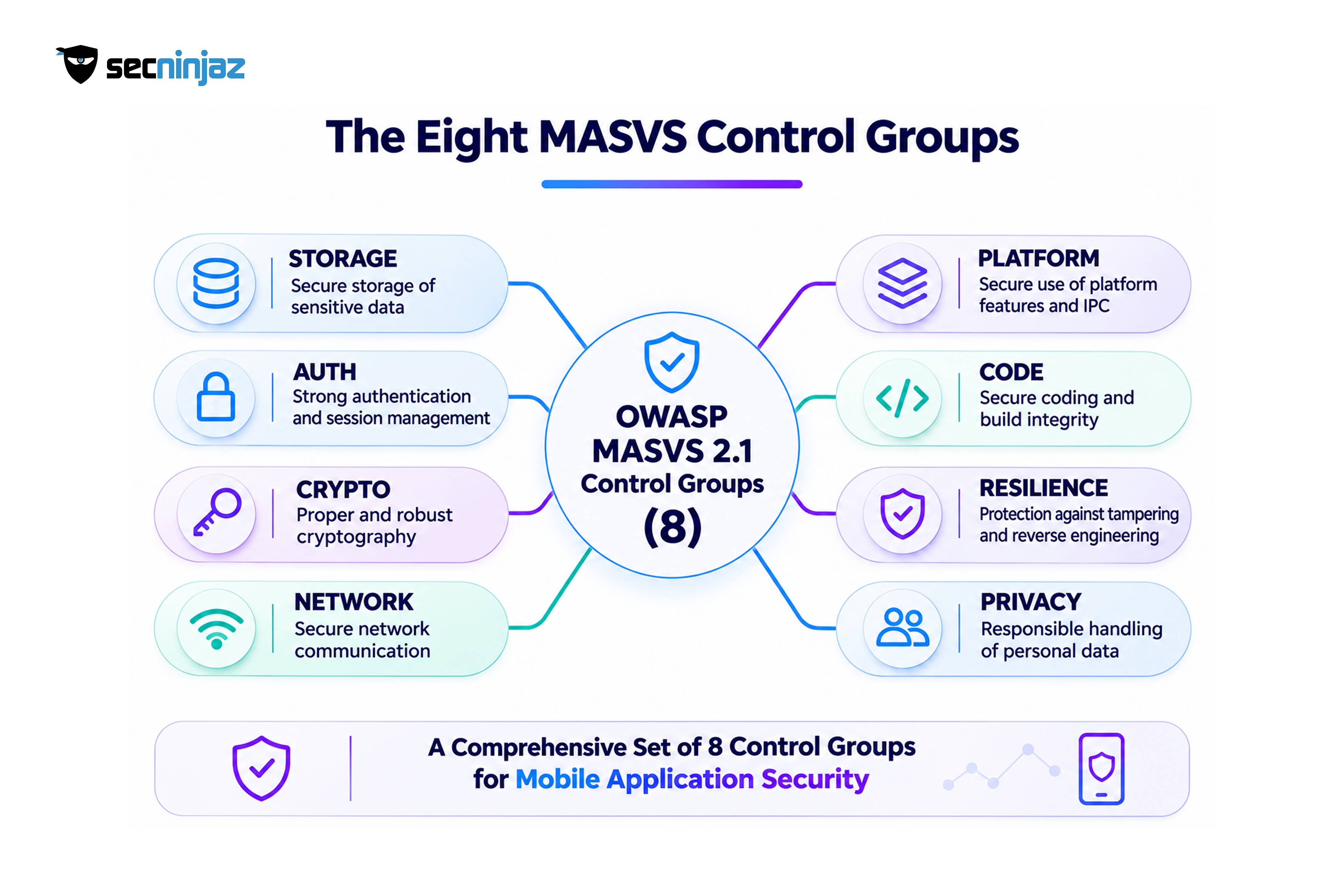
Most teams reach for a checklist, and the checklist matters more than it seems. A large share of the "MASVS checklists" in circulation were built for MASVS version 1, with its long list of numbered requirements and the L1, L2, and R verification levels. OWASP restructured the standard in 2023. The current version, MASVS v2.1.0, has 24 controls in eight groups, the levels now live in the testing guide as profiles, and MASTG v2 is the testing reference. A checklist for 2026 should follow that structure.
Talk to Our Security Experts →
A checklist also has limits that deserve stating up front. MASVS controls are platform-agnostic requirements, so they say what must be true and leave the how to the tests. A banking app and a content app need different depth, which is what the profiles are for. And the standard covers the app, including how it uses server-side authentication, while the backend and APIs need their own testing. This guide covers how OWASP's mobile standards fit together, which profile applies, the full MASVS 2.1 checklist by group, how a test runs, how the Mobile Top 10 maps to it, the Indian requirements that sit on top, and what to do first. It is written for CISOs, product security leads, mobile engineering managers, and the compliance teams that sign off on app releases.
 ## How OWASP's Mobile Standards Fit Together
| Component | What it is | How security teams use it |
|---|---|---|
| OWASP MASVS v2.1.0 | Mobile Application Security Verification Standard containing 24 individual controls across eight control groups | Defines the security and privacy requirements a mobile application should satisfy |
| OWASP MASTG v2.0.0 | Mobile Application Security Testing Guide (released 30 June 2026) containing testing methodologies, technical guidance, test cases, demonstrations, and tools | Provides practical methods for verifying MASVS controls on Android and iOS |
| OWASP MASWE | Mobile Application Security Weakness Enumeration, cataloguing mobile-specific security and privacy weaknesses. The current catalogue runs from MASWE-0001 to MASWE-0078 and should be version-pinned in assessment reports | Provides standardized weakness references for documenting assessment findings |
| OWASP MAS Testing Profiles | Risk-based profiles: MAS-L1, MAS-L2, MAS-R, and MAS-P | Helps determine the security and privacy controls relevant to an application's threat model |
| OWASP Mobile Application Security Checklist | A tester-maintained assessment tracker mapping applicable MASVS controls to relevant MASTG tests | Tracks assessment coverage, evidence, results, and remediation status |
| OWASP Mobile Top 10 (2024) | A mobile application security risk awareness document | Communicates common mobile security risks and helps prioritize remediation |
The OWASP Mobile Application Security project provides a connected framework for defining, testing, and documenting mobile application security. MASVS establishes the security requirements, MASWE provides a structured catalogue of weaknesses, and MASTG describes the technical testing procedures used to verify those requirements.
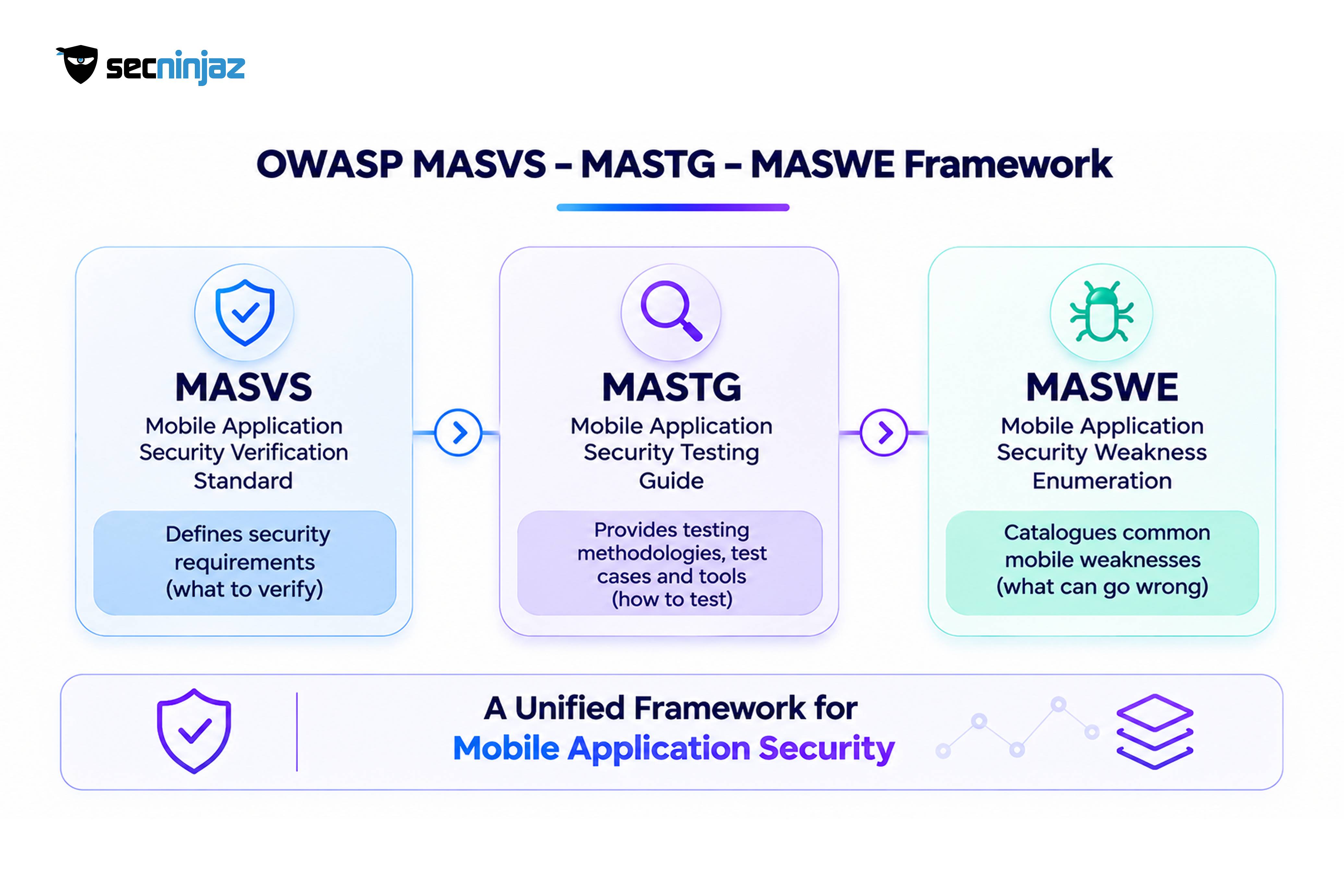 The relationship can be represented as:
MASVS Control → MASWE Weakness → MASTG Test Case → Assessment Evidence → Verified Finding
One important distinction applies to MASTG v2: the older generated MAS Checklist spreadsheet is no longer distributed as an official release artifact. Security teams should maintain their own assessment tracker and reference the current MASVS controls and MASTG test cases directly. This helps preserve traceability without relying on an outdated checklist or test-case mapping.
Singapore's Cyber Security Agency also developed its Safe App Standard based on OWASP MASVS, particularly addressing authentication, storage, and resilience controls. This demonstrates the relevance of MASVS beyond individual security assessments.
Which Profile Applies to Which App
MASVS v2 removed the L1, L2, and R verification levels from the standard itself, and the testing guide now defines them as profiles that decide which controls are in scope and how deeply they are tested.
| Profile | Security objective | Attacker model | Typical application scenarios |
|---|---|---|---|
| MAS-L1 – Essential Security | Establish essential mobile application security controls | Other applications installed on the device may act as adversaries | General consumer applications, low-risk applications, and applications with limited sensitive functionality |
| MAS-L2 – Advanced Security | Provide stronger protection against advanced device-level threats | The operating system cannot be fully trusted, and attackers may have physical access to the device | Banking, payments, healthcare, insurance, and applications processing sensitive information |
| MAS-R – Resilient Security | Increase resistance to reverse engineering, tampering, and runtime manipulation | The legitimate device user may actively attempt to manipulate or reverse engineer the application | Financial applications, games, applications protecting valuable business logic, and applications requiring stronger runtime integrity |
| MAS-P – Baseline Privacy | Protect personal information and promote responsible data handling | Privacy-focused assessment rather than a specific attacker capability model | Applications collecting personal information, location data, health information, or behavioral data |
MAS testing profiles should be selected through application-specific threat modeling rather than assigning a profile solely on the basis of the application's business category.
For example, a banking application handling financial transactions, authentication credentials, and sensitive customer information may require MAS-L2, MAS-R, and MAS-P, alongside the essential protections covered by MAS-L1.
A healthcare application processing medical records and personal information may require MAS-L2 and MAS-P, with MAS-R added where application integrity or sensitive business logic requires stronger protection.
A government citizen-services application may require MAS-L2 and MAS-P depending on the sensitivity of the information and the operations it supports.
A content or news application with limited sensitive functionality may begin with MAS-L1 and MAS-P.
The final profile combination should be justified through threat modeling, business risk, data sensitivity, attacker capabilities, and regulatory obligations. Where the default profiles do not adequately address application-specific threats, organizations should develop a customized testing profile.
 ## The MASVS 2.1 Checklist for 2026
The following assessment checklist is based on the eight control groups and 24 individual controls defined in OWASP MASVS v2.1.0. It is designed as a practical reference for security assessors, mobile application developers, and product security teams conducting Android and iOS security assessments.
Each control identifies the security requirement and the corresponding areas that should be examined during testing. The testing activities are illustrative and should be expanded using the applicable MASTG v2 test cases, platform-specific techniques, and application threat model.
This is a practical assessment reference rather than an official OWASP checklist spreadsheet. Actual assessment coverage should be determined by the selected MAS testing profiles and documented with test references, evidence, findings, and remediation status.
MASVS-STORAGE
| Control | Requirement | What testers check |
|---|---|---|
| MASVS-STORAGE-1 | The app stores sensitive data securely | Credentials, tokens, and personal data in local files, databases, preferences, and keychain or keystore use |
| MASVS-STORAGE-2 | The app prevents leakage of sensitive data | Logs, backups, clipboard, screenshots, keyboard caches, and data shared with other apps or services |
MASVS-CRYPTO
| Control | Requirement | What testers check |
|---|---|---|
| MASVS-CRYPTO-1 | The app uses current cryptography according to best practices | Algorithms, modes, random number generation, and any custom or outdated schemes |
| MASVS-CRYPTO-2 | The app manages keys according to best practices | Hard-coded keys, key generation and storage, hardware-backed key stores, and key lifecycle |
MASVS-AUTH
| Control | Requirement | What testers check |
|---|---|---|
| MASVS-AUTH-1 | The app uses secure authentication and authorization protocols | Session and token handling, expiry, refresh, and enforcement on the server rather than the client |
| MASVS-AUTH-2 | The app performs local authentication securely | Biometric and PIN flows, and whether authentication is tied to protected operations or can be bypassed |
| MASVS-AUTH-3 | The app secures sensitive operations with additional authentication | Step-up authentication for payments, profile changes, and other high-impact actions |
MASVS-NETWORK
| Control | Requirement | What testers check |
|---|---|---|
| MASVS-NETWORK-1 | The app secures all network traffic according to current best practices | Transport configuration, certificate validation, cleartext traffic, and fallback behavior |
| MASVS-NETWORK-2 | The app performs identity pinning for endpoints under the developer's control | Pinning implementation, rotation and backup plans, and behavior on failure |
Identity pinning is a risk-based control, not a universal requirement for every app. Where it is applied, it needs planned certificate rotation, backup pins, and a recovery path for pinning failures, since an unmanaged pin can lock legitimate users out of the application.
MASVS-PLATFORM
| Control | Requirement | What testers check |
|---|---|---|
| MASVS-PLATFORM-1 | The app uses inter-process communication securely | Exported components, intents and URL schemes, deep links, and content providers |
| MASVS-PLATFORM-2 | The app uses WebViews securely | JavaScript bridges, loaded content sources, file access, and navigation controls |
| MASVS-PLATFORM-3 | The app uses the user interface securely | Exposure of sensitive data on screen, overlay and screenshot protection, and secure input fields |
MASVS-CODE
| Control | Requirement | What testers check |
|---|---|---|
| MASVS-CODE-1 | The app requires an up-to-date platform version | Minimum operating system and target SDK settings |
| MASVS-CODE-2 | The app has a mechanism for enforcing app updates | Behavior when a vulnerable or unsupported version is in use |
| MASVS-CODE-3 | The app uses only components without known vulnerabilities | Third-party libraries and SDKs, with a software bill of materials |
| MASVS-CODE-4 | The app validates and sanitizes untrusted input | Input from users, files, links, other apps, and servers |
MASVS-RESILIENCE
| Control | Requirement | What testers check |
|---|---|---|
| MASVS-RESILIENCE-1 | The app validates the integrity of the platform | Detection of rooted or jailbroken devices, emulators, and compromised environments |
| MASVS-RESILIENCE-2 | The app implements anti-tampering mechanisms | Signature and integrity checks, and behavior when the app is repackaged or modified |
| MASVS-RESILIENCE-3 | The app implements anti-static analysis mechanisms | Obfuscation, and whether secrets and logic can be read from the package |
| MASVS-RESILIENCE-4 | The app implements anti-dynamic analysis mechanisms | Detection of debuggers and instrumentation frameworks |
Resilience controls, including root or jailbreak detection and obfuscation, are defense-in-depth measures that raise the cost of an attack. They do not remove the weakness underneath and are not a substitute for secure architecture. They apply under the MAS-R profile.
MASVS-PRIVACY
| Control | Requirement | What testers check |
|---|---|---|
| MASVS-PRIVACY-1 | The app minimizes access to sensitive data and resources | Requested permissions against the features that need them |
| MASVS-PRIVACY-2 | The app prevents identification of the user | Persistent identifiers, fingerprinting, and data linkable to a person |
| MASVS-PRIVACY-3 | The app is transparent about data collection and usage | Alignment between what the app sends and what the notice and store disclosures say |
| MASVS-PRIVACY-4 | The app offers user control over their data | Consent, withdrawal, access, and deletion functions |
Android and iOS: Platform-Specific Security Testing
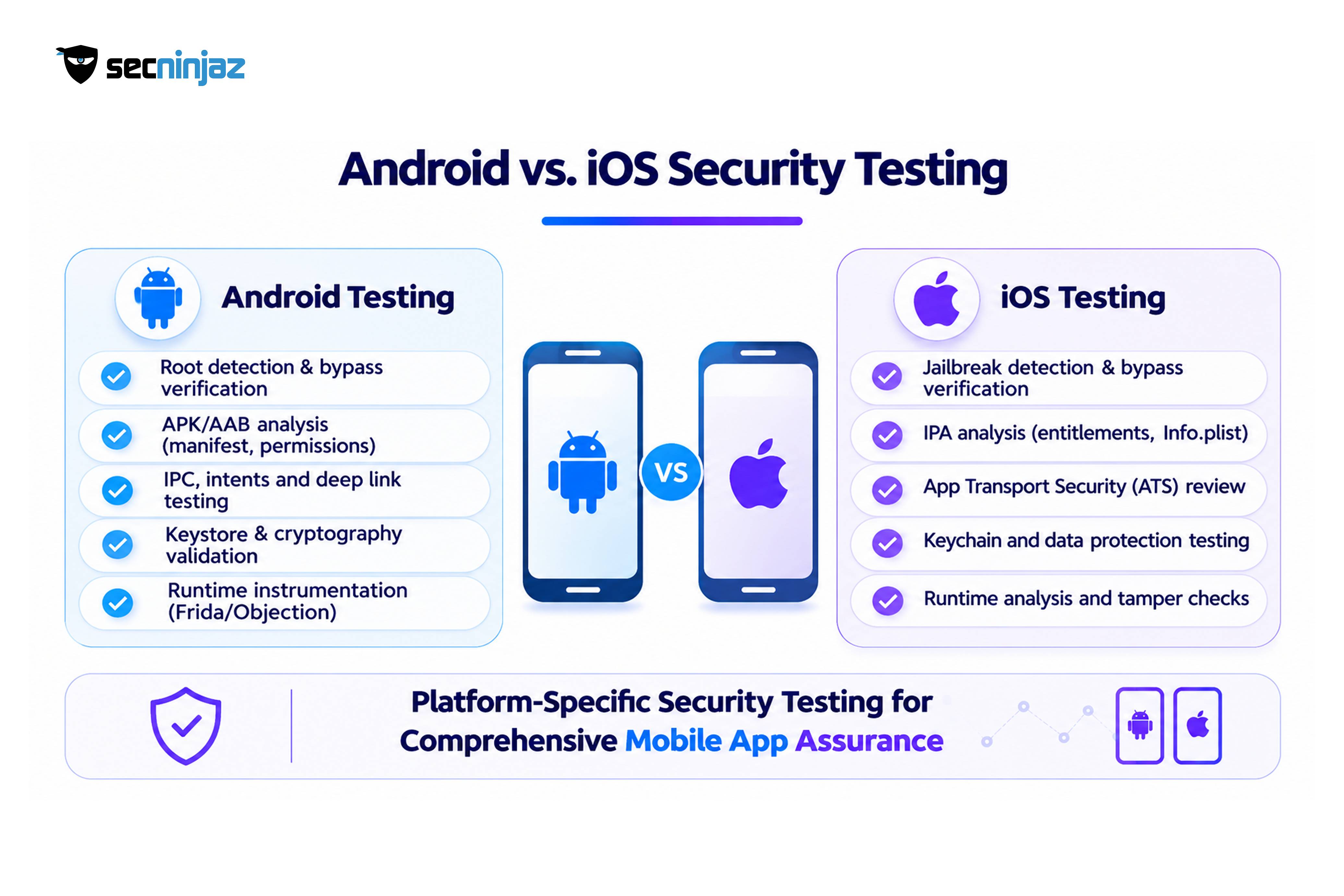
Although MASVS provides platform-agnostic security requirements, their implementation and verification differ significantly between Android and iOS. A complete mobile application security assessment should examine platform-specific security mechanisms, application configurations, storage implementations, and inter-application communication.
 | Security Area | Android Testing Considerations | iOS Testing Considerations |
| --- | --- | --- |
| Application package analysis | Examine APK/AAB configuration, AndroidManifest.xml, exported activities, services, broadcast receivers, and content providers | Examine IPA structure, Info.plist, entitlements, provisioning profiles, and application configuration |
| Local data storage | Inspect SharedPreferences, SQLite databases, files, cache directories, external storage, and Android Keystore usage | Inspect Keychain, UserDefaults, Core Data, SQLite, application sandbox, and file protection attributes |
| Authentication | Test biometric authentication, session handling, token storage, authentication bypass, and Android BiometricPrompt implementation | Test Face ID, Touch ID, LocalAuthentication, Keychain access controls, and authentication state management |
| Network communication | Inspect TLS configuration, certificate validation, Network Security Configuration, and cleartext traffic permissions | Inspect ATS configuration, TLS implementation, certificate validation, and URLSession networking behavior |
| Inter-process communication | Examine intents, deep links, exported components, content providers, and custom URL schemes | Examine URL schemes, Universal Links, custom URL handlers, and application extensions |
| Runtime security | Test root detection, debugging detection, Frida instrumentation, runtime manipulation, and application integrity | Test jailbreak detection, debugging detection, Frida instrumentation, runtime manipulation, and application integrity |
| Code protection | Analyze DEX files, native libraries, embedded secrets, obfuscation, and reverse-engineering resistance | Analyze Mach-O binaries, embedded secrets, symbols, application resources, and reverse-engineering resistance |
| Privacy | Inspect permissions, clipboard usage, logs, screenshots, advertising identifiers, and third-party SDK data collection | Inspect privacy permissions, pasteboard usage, logs, screenshots, tracking identifiers, and third-party SDK data collection |
Android and iOS should be assessed independently. Similar application functionality does not guarantee equivalent security implementation across the two platforms.
Where an application supports multiple operating system versions, testing should also consider the minimum supported OS version, relevant security updates, platform-specific behavior, and deprecated APIs.
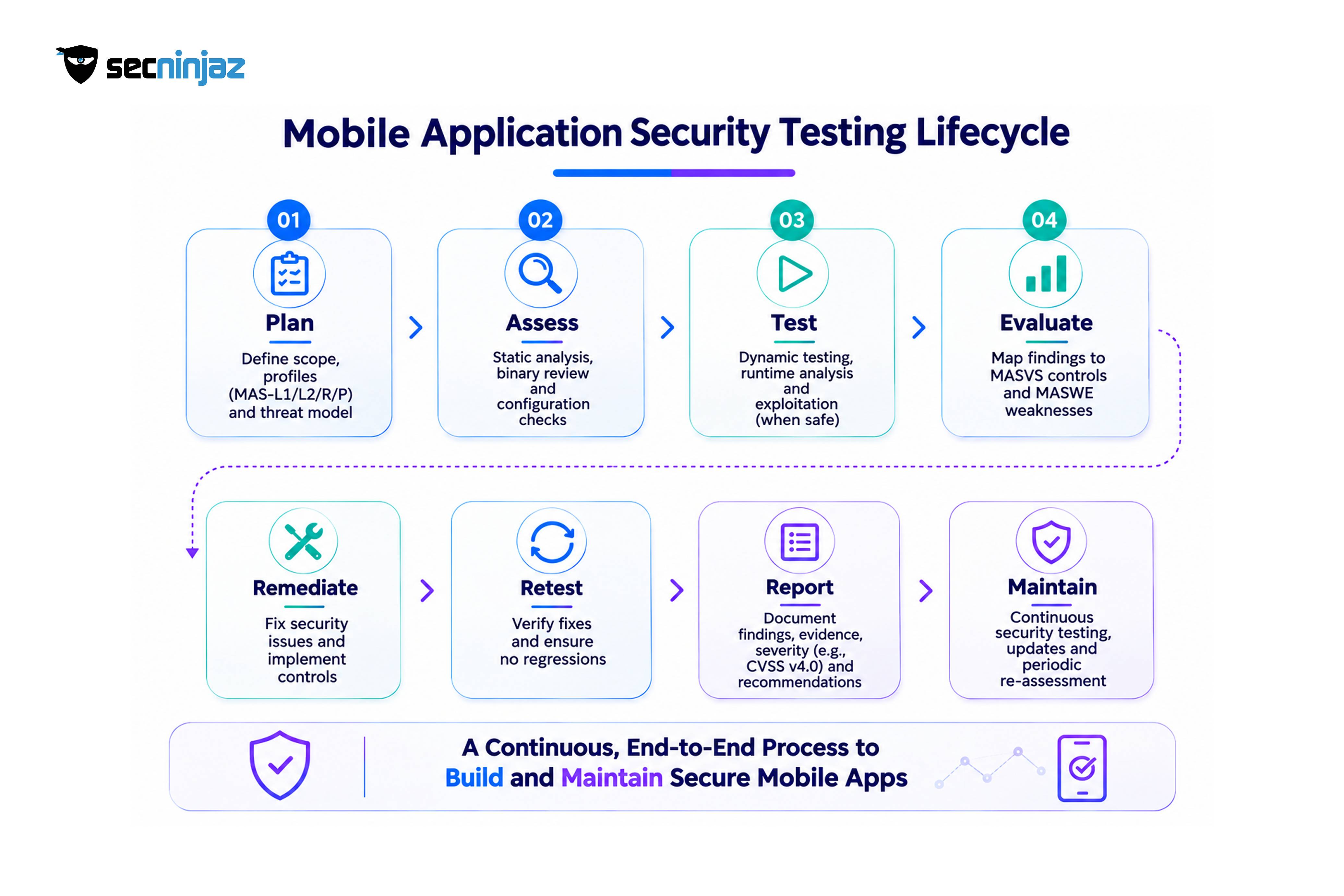
How a Mobile Security Test Runs
| Step | What happens | What it produces |
|---|---|---|
| 1. Scope and profile selection | Agree the platforms, app versions, backend environments, and MAS profiles | A scope that matches app risk |
| 2. Threat modeling | Identify what an attacker or malware on the device would target | A short list of priority abuse cases |
| 3. Build and environment preparation | Obtain release builds, test accounts, and test devices, with a backend test environment | A controlled and repeatable setup |
| 4. Static analysis | Review the package, manifest or property list, resources, code, and dependencies | Findings on secrets, configuration, components, and permissions |
| 5. Dynamic analysis | Run the app and observe storage, memory, traffic, and inter-app behavior in a lab | Findings on runtime behavior and data handling |
| 6. Backend and API testing | Test the services the app depends on for authentication, authorization, and input handling, mapped to OWASP ASVS and the OWASP API Security Top 10 where applicable | Findings that the app-side tests cannot reach |
| 7. Resilience testing | Where MAS-R applies, test tamper, integrity, and analysis defenses | A measure of how much effort an attacker would need |
| 8. Privacy review | Compare actual data flows with notices, permissions, and consent | Findings tied to MAS-P |
| 9. Reporting and retest | Map each finding to a MASVS control, a MASWE weakness, and a MASTG test, rate severity using CVSS v4.0 together with a business impact assessment, then verify the fixes | A traceable report in which each finding states the control ID, test reference, affected platform, evidence, impact, reproduction steps, and remediation guidance, with confirmed remediation |
Key Techniques Used During Mobile Application Security Testing
A comprehensive mobile application security assessment combines automated analysis with manual testing and runtime inspection. The following techniques help identify weaknesses that may not be visible through conventional vulnerability scanning.
| Testing Technique | What Is Examined | Examples of Security Issues |
|---|---|---|
| Static Application Security Testing (SAST) | Application source code, compiled binaries, configuration files, and dependencies | Hardcoded credentials, insecure cryptographic implementations, insecure API endpoints, and vulnerable libraries |
| Mobile Application Package Analysis | APK, AAB, IPA, manifests, entitlements, resources, and embedded configuration | Exposed secrets, excessive permissions, insecure exported components, and debug configurations |
| Dynamic Application Security Testing (DAST) | Application behavior during execution and interaction with backend services | Authentication bypass, insecure session management, improper authorization, and insecure data handling |
| Runtime Instrumentation | Application methods, runtime objects, memory, and security controls | Root or jailbreak detection bypass, runtime manipulation, sensitive data exposure, and authentication bypass |
| Network Traffic Analysis | TLS implementation, API requests, responses, certificates, and session tokens | Cleartext transmission, weak certificate validation, token exposure, and insecure communication |
| Reverse Engineering | Decompiled code, application logic, binary structure, and security mechanisms | Exposed business logic, embedded secrets, weak obfuscation, and tampering opportunities |
| Backend and API Security Testing | Authentication, authorization, business logic, input validation, and access control | Broken object-level authorization, privilege escalation, insecure direct object references, and transaction manipulation |
| Privacy and Data Flow Analysis | Permissions, third-party SDKs, analytics, telemetry, and personal information handling | Excessive data collection, unauthorized tracking, sensitive information leakage, and inadequate consent handling |
No individual technique provides complete assurance. A reliable assessment combines static analysis, dynamic analysis, manual exploitation, and evidence-based verification against the applicable MASVS controls.
Common tools used during mobile application security assessments include:
| Tool | Primary Purpose |
|---|---|
| MobSF | Automated mobile application security analysis and initial vulnerability identification |
| jadx | Android DEX decompilation and source-code inspection |
| apktool | APK resource extraction, manifest analysis, and application package modification |
| Frida | Dynamic instrumentation and runtime analysis |
| objection | Runtime mobile application exploration and security testing |
| Burp Suite | Interception, inspection, and manipulation of application network traffic |
| OWASP MASTG | Standardized mobile security testing procedures, test cases, and technical guidance |
Automated tools help identify potential vulnerabilities and improve testing coverage, but their results require manual validation. A scanner cannot independently determine whether an application-specific authorization decision is correct, whether a business transaction can be manipulated, or whether multiple low-severity weaknesses can be chained into a significant security issue.
Tool selection should therefore be driven by the application's architecture, operating system, selected MAS testing profile, and assessment objectives.
Two practical points matter. Release builds should be tested, not debug builds, because defenses and configuration often differ. And testing should cover Android and iOS separately, since the same control behaves differently on each platform.
 ## Mapping the OWASP Mobile Top 10 to MASVS
The OWASP Mobile Top 10 (2024) provides a risk-oriented view of common mobile application security weaknesses, whereas MASVS defines verifiable security and privacy controls. The following mapping identifies the closest MASVS control groups associated with each Mobile Top 10 category. Individual vulnerabilities may span multiple control groups depending on the application architecture and implementation.
| OWASP Mobile Top 10 (2024) | Primary MASVS Mapping | Additional Testing Considerations |
|---|---|---|
| M1 – Improper Credential Usage | STORAGE, AUTH, CRYPTO | Credential lifecycle, token handling, and secrets management |
| M2 – Inadequate Supply Chain Security | CODE, RESILIENCE | Third-party SDKs, dependency integrity, build pipeline, and software provenance |
| M3 – Insecure Authentication/Authorization | AUTH, STORAGE | Session management, privilege escalation, and backend authorization |
| M4 – Insufficient Input/Output Validation | CODE, PLATFORM | Deep links, WebViews, IPC, and untrusted input handling |
| M5 – Insecure Communication | NETWORK, CRYPTO | TLS configuration, certificate validation, and sensitive information transmission |
| M6 – Inadequate Privacy Controls | PRIVACY, STORAGE | Data minimization, consent, tracking, and sensitive data exposure |
| M7 – Insufficient Binary Protections | RESILIENCE, CODE | Reverse engineering, tampering, and binary integrity |
| M8 – Security Misconfiguration | PLATFORM, CODE, NETWORK | Insecure permissions, exported components, debugging settings, and network configuration |
| M9 – Insecure Data Storage | STORAGE, CRYPTO | Local databases, files, backups, logs, and key management |
| M10 – Insufficient Cryptography | CRYPTO, STORAGE, NETWORK | Cryptographic algorithms, key management, randomness, and encryption implementation |
The Indian Requirements Layer
A MASVS-based test produces evidence that several Indian requirements ask for in different words.
| Regulatory Framework | Applicability and Security Expectations | Relevant MASVS Areas |
|---|---|---|
| RBI Master Direction on Digital Payment Security Controls, 2021 | Applicable regulated entities must implement security controls covering secure application development, source code review, vulnerability assessment, penetration testing, device binding, application integrity, data protection, and secure payment processing. | AUTH, STORAGE, CRYPTO, NETWORK, CODE, RESILIENCE |
| RBI Master Directions on Cyber Resilience and Digital Payment Security Controls for Non-bank PSOs, 2024 | Applicable non-bank Payment System Operators must implement cybersecurity governance, risk management, application security, vulnerability management, and digital payment security controls according to the prescribed implementation timelines. | AUTH, STORAGE, CRYPTO, NETWORK, CODE, RESILIENCE |
| Digital Personal Data Protection Act, 2023 and DPDP Rules, 2025 | Data Fiduciaries must implement reasonable security safeguards to protect personal data, including encryption, masking, access controls, logging, monitoring, backups, and appropriate processor-related safeguards under the applicable provisions. | STORAGE, CRYPTO, AUTH, PRIVACY |
| Guidelines for Indian Government Websites and Apps (GIGW 3.0) | Government websites and mobile applications are subject to security auditing and audit clearance requirements before production hosting. GIGW also addresses accessibility, including WCAG 2.1 Level AA conformity. | STORAGE, AUTH, NETWORK, PLATFORM, CODE, PRIVACY, alongside accessibility testing |
| STQC Security Audit Requirements | Where applicable to government systems and procurement requirements, security assessments and audit clearance must follow the relevant STQC or approved laboratory requirements. | Applicable MASVS controls based on the assessment scope |
The regulatory applicability of these frameworks depends on the organization's business model, regulatory status, and the nature of the application.
The RBI Digital Payment Security Controls Directions, 2021 apply to specified regulated entities, including scheduled commercial banks (excluding Regional Rural Banks), small finance banks, payments banks, and credit card-issuing NBFCs. Non-bank Payment System Operators are addressed separately under RBI's 2024 Master Directions on Cyber Resilience and Digital Payment Security Controls.
The Digital Personal Data Protection Act, 2023 and the DPDP Rules, 2025 introduce security obligations for Data Fiduciaries processing digital personal data. Rule 6 specifies reasonable security safeguards, including encryption, masking, access controls, logging, monitoring, backups, and security arrangements with Data Processors. The relevant substantive provisions and Rule 6 are scheduled to commence eighteen months after publication of the November 2025 Gazette notifications, in May 2027.
For government mobile applications, GIGW 3.0 addresses both cybersecurity and accessibility. Its cybersecurity requirements include security auditing and audit clearance before production hosting, while accessibility requirements include WCAG 2.1 Level AA conformity.
MASVS provides a useful technical verification framework for mobile application security, but MASVS compliance alone does not establish compliance with RBI directions, DPDP obligations, GIGW, or STQC requirements. Organizations should maintain a separate regulatory control mapping that connects applicable legal and regulatory requirements to technical assessment evidence.
OWASP MASVS is a technical security verification standard, not a regulatory certification or legal compliance framework. A successful MASVS-based assessment provides evidence about the security controls examined within the defined scope. Organizations must separately evaluate regulatory applicability, governance requirements, privacy obligations, operational controls, and any mandatory audit or certification requirements.
What Weak Mobile Testing Costs
| Gap | Consequence |
|---|---|
| Testing against an outdated MASVS v1 checklist | Missing privacy controls and mismatched profiles, and findings that do not map to current references |
| Testing only debug builds | Release defenses and configuration go unexamined |
| Ignoring the backend | Authorization flaws that the app cannot reveal remain open |
| Skipping resilience for a payments app | Attackers can reverse engineer the app cheaply, as the Zimperium report describes malware built from reverse engineered banking apps |
| Treating certificate pinning as complete network security | Weak transport configuration and fallback behavior survive |
| No privacy review | Gaps between data flows and notices that matter once the DPDP safeguards take effect |
| No retest after fixes or SDK updates | Regressions and newly vulnerable components |
A Maturity Model for Mobile Application Security
Level 1: Apps are tested only for functionality, and security relies on the platform's defaults ↓ Level 2: A scanner runs before release and results are reviewed informally ↓ Level 3: A MASVS-based test covers storage, crypto, authentication, network, and platform controls on both operating systems ↓ Level 4: Profiles are chosen by risk, resilience and privacy are tested, backend testing runs alongside, and findings map to MASVS and MASTG references ↓ Level 5: Testing is integrated into the delivery pipeline with dependency monitoring, regular manual assessments, and evidence retained for regulators and customers
The step from Level 2 to Level 3 matters most, since a standard-based test replaces an unstructured scan with coverage that can be shown.
A Readiness Plan Before the Test
- Choose the profiles by risk. Decide on MAS-L1, MAS-L2, MAS-R, and MAS-P with the product owner.
- List the sensitive data and operations. Credentials, personal data, payments, and profile changes drive priorities.
- Prepare release builds and test accounts for both platforms.
- Provide a backend test environment. Backend services should be in scope.
- Produce a software bill of materials. Third-party components are a frequent source of findings.
- Document privacy data flows. Compare them with notices and permissions.
- Agree reporting format and severity. Findings should map to MASVS controls and be reproducible.
- Plan the retest. Allow time to fix and verify before release.
- Provide architecture and data-flow diagrams. Include application components, backend integrations, third-party SDKs, authentication flows, and sensitive data transmission paths.
- Identify critical business workflows. Document payment processing, account registration, password recovery, transaction authorization, profile modifications, and other sensitive operations.
- Define test-device requirements. Agree on supported Android and iOS versions, rooted or jailbroken test devices where applicable, emulator configurations, and test accounts.
- Establish evidence and reporting requirements. Define how vulnerabilities will be documented, mapped to MASVS controls, assigned severity, reproduced, and verified after remediation.
Common Mistakes and Edge Cases
Using a version 1 checklist. The structure, the privacy group, and the profile model have changed.
Treating resilience controls as security. Obfuscation and root detection slow attackers and do not fix a flawed design.
Hard-coding secrets in release builds. A key in the package is a key in the attacker's hands.
Testing one platform and assuming the other matches. Android and iOS differ in storage, inter-app communication, and permissions.
Trusting the client for authorization. Controls enforced only in the app can be bypassed on a device the attacker controls.
Ignoring third-party SDKs. Libraries bring their own permissions, data collection, and vulnerabilities.
Skipping the retest. A fix that was never verified is still a hypothesis.
Real-World Mobile Application Attack Scenarios
| Attack Scenario | How the Attack Works | Relevant MASVS Controls |
|---|---|---|
| Insecure Local Token Storage | An attacker with access to a compromised device extracts authentication tokens from application storage and attempts to reuse them. | STORAGE, AUTH |
| Deep Link Manipulation | An attacker crafts malicious deep links to access unintended application functionality or manipulate navigation and transaction flows. | PLATFORM, CODE |
| Certificate Validation Bypass | An attacker intercepts application traffic by exploiting inadequate certificate validation or insecure trust configuration. | NETWORK |
| Runtime Instrumentation | An attacker uses instrumentation frameworks to modify runtime behavior, bypass security checks, or inspect sensitive application data. | RESILIENCE, AUTH |
| Biometric Authentication Bypass | Weak local authentication implementation allows sensitive operations to proceed without the required authentication assurance. | AUTH |
| Insecure Backup Exposure | Sensitive application data is included in device backups and becomes accessible outside the intended application security boundary. | STORAGE |
| API Authorization Abuse | An attacker modifies identifiers or requests to access another user's information or perform unauthorized transactions. | AUTH, with separate backend/API security testing |
| Application Repackaging | An attacker modifies the application package, embeds malicious functionality, or distributes a repackaged application. | RESILIENCE, CODE |
When to Use What: A Few Decision Points
Automated analysis versus manual testing. Automation gives broad, repeatable coverage and suits every build. Manual testing finds logic flaws, authorization gaps, and chained issues that scanners miss, and it is the main source of depth for MAS-L2 and MAS-R.
Android first or iOS first. Test whichever platform carries more users and more sensitive functions first, but plan both, since parity of controls is itself a finding.
Internal versus external testing. Internal teams can run scans and basic checks continuously. An external assessment adds independence, specialist skill in resilience testing, and credibility with regulators and partners.
When to add runtime protection. An app that handles payments or valuable credentials, or that is targeted by malware, is a candidate for runtime application self-protection. It should follow, not replace, secure design and testing.
Point-in-time versus continuous testing. A major release justifies a full assessment. Frequent releases justify dependency monitoring and automated checks in the pipeline, with manual review at defined intervals.
How SecNinjaz Supports Mobile Application Security
Mobile applications require security testing that goes beyond automated vulnerability scanning. Organizations need to understand how their applications behave under real-world attack conditions, how sensitive information is protected, and whether security controls can withstand attempts to bypass them.
SecNinjaz Mobile Application Security Testing provides security assessment services for Android and iOS applications, combining static analysis, dynamic testing, manual security assessment, and controlled exploitation to identify vulnerabilities across application components.
The assessment approach covers:
- Application Security Assessment: Examination of application architecture, configurations, permissions, and security implementation.
- Secure Data Storage: Assessment of local databases, files, credentials, authentication tokens, and cryptographic key management.
- Authentication and Authorization: Testing of authentication workflows, session management, access controls, and sensitive transaction authorization.
- Network Security: Examination of TLS configuration, certificate validation, and application-to-server communication.
- Runtime and Application Resilience: Testing of application integrity, reverse-engineering resistance, tampering, and runtime security mechanisms.
- Backend Integration Security: Assessment of application dependencies and associated backend services, including authentication and authorization weaknesses.
- Privacy and Data Protection: Examination of sensitive information handling, application permissions, third-party SDKs, and privacy-related controls. Testing can be aligned with the OWASP MASVS and MASTG frameworks, with findings mapped to relevant security controls and supported by reproducible technical evidence.
SecNinjaz also provides application security testing through its STQC Services portfolio, covering web, mobile, and API applications. Organizations requiring government or regulated-sector audit clearance should verify the applicable laboratory approval and engagement requirements before selecting an assessment provider.
The assessment findings can also be mapped to applicable regulatory requirements, including RBI digital payment security controls, DPDP security safeguards, and GIGW requirements, helping organizations connect technical vulnerabilities with broader security and compliance objectives.
Whether an organization is preparing for a new application release, conducting periodic security assessments, or strengthening an existing mobile application security programme, a structured, evidence-based assessment helps identify weaknesses before they become security incidents.
Talk to Our Security Experts →
Frequently Asked Questions
What is OWASP MASVS?
The Mobile Application Security Verification Standard is OWASP's standard of security requirements for mobile apps. The current version, v2.1.0, has 24 controls in eight groups: storage, cryptography, authentication, network, platform, code, resilience, and privacy. It covers both Android and iOS.
What is the difference between MASVS and MASTG?
MASVS defines what a secure mobile app must do. The Mobile Application Security Testing Guide, MASTG, describes how to verify each requirement on Android and iOS through tests, demos, techniques, and tools. MASTG v2.0.0, released on 30 June 2026, is now the canonical reference for OWASP MAS testing, and each test is published as an individually referenceable page.
What happened to MASVS levels L1, L2, and R?
MASVS v2.0.0 removed them from the standard itself. They now exist as testing profiles, MAS-L1, MAS-L2, and MAS-R, in the testing guide, alongside MAS-P for privacy. The profiles decide which controls are in scope and how deeply they are tested.
Does MASVS cover backend and API security?
MASVS covers the app, including how it uses server-side authentication, but not the backend itself. Backend services and APIs need their own testing, so a complete mobile assessment includes them in scope.
Which MAS profile should a banking or payments app use?
Banking and payments apps typically combine MAS-L1, MAS-L2, and MAS-R, with MAS-P for privacy. They handle sensitive data and money, face targeted malware, and fall under the RBI's Digital Payment Security Controls Directions, which require security testing and set mobile-specific controls.
What does the RBI require for mobile payment app security testing?
The RBI's Digital Payment Security Controls Directions of 18 February 2021 require regulated entities to conduct security testing of digital payment applications, including source code review, vulnerability assessment, and penetration testing. They also set mobile controls such as device binding, deactivation of older app versions within six months, and code obfuscation.
How often should a mobile app be security tested?
A full assessment is appropriate before a major release and after significant changes to authentication, data handling, or dependencies. Apps with frequent releases benefit from dependency monitoring and automated checks in the delivery pipeline, with manual assessment at defined intervals.
Where should a team start with mobile application security testing?
Start by choosing the MAS profiles that match the app's risk, listing the sensitive data and operations, and preparing release builds, test accounts, and a backend test environment. Then run a MASVS-based test on both platforms, map findings to control references, and retest after fixes.